The gamification of this is really good. I had a Fitbit before, and it was all about step count. But now that I have a Watch, it's much more about being up and active. With watchOS 3, Activity Sharing was added: this allows users of the Apple Watch to view not only their fitness data, but their trusted friends as well. Within my ring circle of friends, it's been nice to motivate each other into doing a little more, even when we aren't talking. I can see that Sam just rode his bike, I can tell that Jeff has hit the treadmill - and I can feel like I'm not doing enough and get after it.
We also get to send responses when someone hits an achievement, which we have made more fun by using the standard responses of the watch. I can be encouraging, or I can be sarcastic. I'm not seeing the results I want to see in my health just as yet, but I know I will be soon. And I'm happy that my friends will also get to encourage me along the way and share in the fun.
Watch Bands
One surprising bit for me has been the customization. I'm really enjoying the swapping of bands, the changing of watch faces,1 and the unique way I can match all of this to the outfit or activity I am doing at the time. And while I'm not going to get all crazy and buy every band out there, having some options has been really great.
Currently, I have a couple of third-party bands that I really like. Aside from the black sport band that came with it, I also have a concrete-colored band that is the same. Well, nearly the same. Apple's material feels better, is likely better made, and will likely last longer over time; however, for $8-10 per band, I can get five of the 3rd-party bands for the price of one Apple band. When the Nike Apple Watch was announced, I liked the look of the new band; the fluoroelastomer bands can retain heat/sweat, and the Nike band seems to be better at reducing the amount. I also got a nylon band that is extremely similar to Apple's version, but for less than a third of the price. I wanted to get something fancy, but thanks to trade with a friend of mine, I now have a Milanese loop that has quickly become my favorite band. I didn't think I'd like it as much as I have, but it's really, really great.
I'm sure I'll get more bands, and I'll likely have to get help for the amount that I ultimately get. But I'm trying to keep it limited, trying to keep it fun and interesting, and have something that's personal to me. I'm digging it.
Note: when ordering bands, especially on Amazon, make sure you are ordering the correct size for your watch. The links above are for the 42mm M/L size bands, where applicable.
Anker Power Charger
I had purchased one of these for my wife a while ago, as she was charging multiple devices by her side of the bed. I had just been using the power bricks that came with my devices. But right after getting the Apple Watch, I needed to change this. It had become cumbersome. So, I ordered the Anker 40W/8A 5-Port USB Charger PowerPort 5 for my own use. And although I didn't get in time for a recent business trip, now that I have it at home, the cord management has never been easier. Couple this with a few Monoprice Cable Ties - power & cord mischief is managed.
I'm hopeful that Apple will allow custom watch faces at some point in the future. ↩
I've been using my iPhone as my primary computer for a long time now. I've been limited to one screen, not able to have a second screen to rely on for viewing or other interactions. And whilst I can get all of what I need done on a single screen, having a secondary screen would be really great.
Most people I know use multiple screens: a phone and a computer, a phone and a tablet, or even a phone + tablet + tablet + PC. But when I really started thinking about what I need my second screen to do, I wasn't thinking of something larger than the Plus-sized screen I currently have: I get enough done on that already. I wanted to think portable. I wanted something to complement my mobile experience — and that's what led me to get my Apple Watch.
Having this as a second screen has been really amazing. Sure, it's not like an iPad or a Mac. It's severely limited in what it does, but it also changes my device interaction for the better. The notifications are worth the price of admission. My phone is always on silent. The only notifications I get are on my wrist now. No longer am I checking multiple things all the time, I'm focused on the quick tap, decide if I need to respond, and move along with what I was doing. It doesn't disturb my conversations, it allows me to focus more on my family, and makes me a present individual.
I didn't expect was how having the second screen would change the way I use my devices: not just behaviors, but also with my app selection. There are apps that I'm giving another shot because they work so well with the watch. There are other apps that I've used for years that I'm eliminating because their watch experience is just awful. Native watch apps are really great, like Reminders and Calendar. Other apps, like Carrot Weather, are worth the extra money for certain features like complications that make their app the best for both phone and watch. And I finally get to use Drafts on my wrist to capture text, which is incredibly useful.
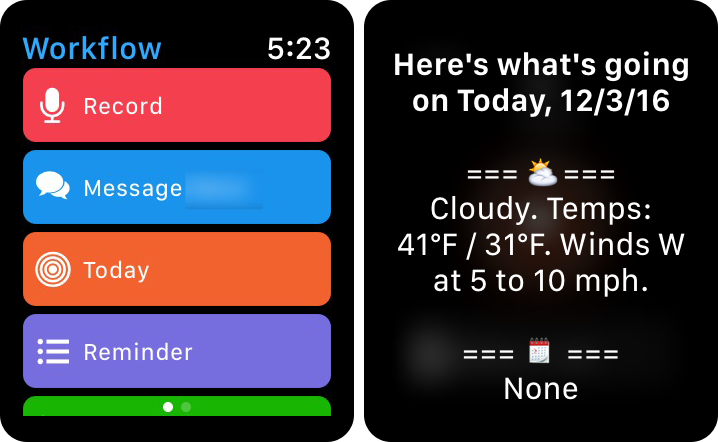
If you're reading this, you know that I love workflows. If there is something I can set up to make my life easier, then that's what I want to have. And now that I'm able to kick things off on my wrist, it's making things a little bit easier. Previously, I had a workflow in Workflow that gave my a daily agenda. Over time, I've modified it and changed it based on my ever-changing needs/apps. But, I had to set a reminder to remember to run the workflow the night before, which ultimately lead to me not running it at all. But when I got the watch, that changed things. Seth and I got to talking one day, I modified the workflow I had, formatted it in a bunch of different ways, and made it available in the widget and on the watch. Now, not only can I look at a daily agenda, I can do it today, from my wrist, with a single tap.
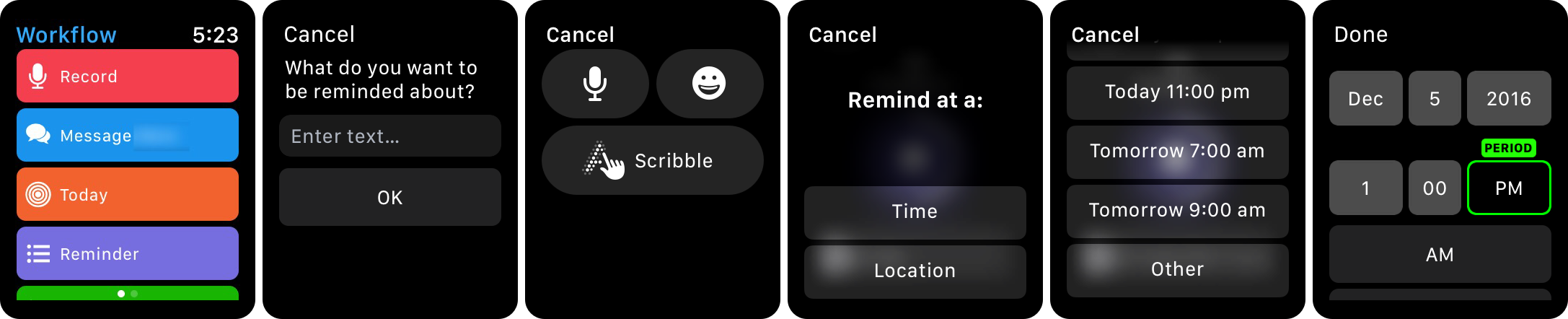
Another thing that has been useful is Reminders on the Apple Watch. Using Siri is by far and away the easiest way to input a reminder, especially on the watch. But there are often times that I can't have my phone out, and I also need to be silent. Using this workflow, I am able to put in a reminder from my watch, but I'm able to use the scribble input (thought I can still use dictation if I wanted). A few taps later, and I have a reminder saved with a time or a location.
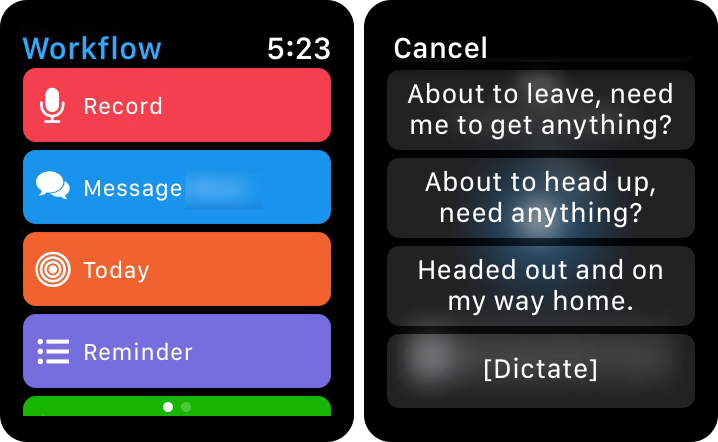
As I'm walking out of work, there are a lot of things that I am now actively doing on the watch rather than my phone. I'll review the shopping list to check if I need to stop in the way home. I'll also send a message to my wife to let her know I'm on my way. I've also created a workflow to send a few different canned messages, along with a Dictate option, so that I can quickly message her when I leave.
I'm actually surprised but the amount that I use my Apple Watch to respond with my voice. It's starting to become my preferred way of interacting with a message. The watch is quick and easy for responding. Additionally, if I'm listening to something on my headphones or watching something on my phone, I can respond on my watch without having to pause the audio/video.
But even more surprising is that I am just recording my voice more. I was using an app called Just Press Record that I used to capture audio snippets when on the go. I might do it for more complex thoughts or for when I'm journaling. Sometimes my youngest says some funny stuff, and I never know when I'm going to need to be ready. But now, I can use Workflow to record and save these things to iCloud, which eliminates another app for me.1
I'm actively working on more of these that will improve my life. Sometimes, the workflow is too much or it doesn't go anywhere. But I'm really starting to think in new ways of how to use this all to my advantage as a second screen. The future of the Apple Watch looks bright. It's not a device that is required by an means, but it really improves a lot of the daily use of my connected devices. It tends to make daily tasks better for me, make me feel better about how I interact with the world around me, and if that's all it does — then it's completely worth it.
Now that I have a second screen in my Apple Watch, I've been thinking more and more about adding a third. There's a lot of compelling things out there about an iPad Pro. I've written before about how much I can do from my iPhone, and that's absolutely still the case. However, I still feel drawn to having this larger screen.
I have read other people's posts about how much they love their iPad Pro. I've read about some of the cool features, like handwritten notes and podcast editing, that really appeal to me and benefit from a larger screen. And while I'd like certain things to come to the iPhone, I'm not sure Apple really feels the same way.
So, I'm having a bit of FOMO. Actually, it's more than that: I know I'm missing out. I'm not trying out a different set of interactions that others do. I'm not able to try more complex automation to propel iOS to new levels and try new things. I'm missing out on trying a new way of interaction and computing that could be helpful to me, my family, my friends, and others. The perspective that I'm losing is substantial. There's always another new thing, but at this point, I've been missing out for a while now.
If I can get this much done on my phone, and now my phone + watch, what the hell could I get done on an iPad? I'm really anxious to find out. It can't come soon enough.
This is something that I've been actively doing now for a while. Feels good. ↩
Over the summer, I experimented with a lot of different app configurations. I tried too many task management apps to see how different things fared. I loved my solution, but I wanted to see what else was out there. Then I bifurcated my tasks and used two apps. Splitting my brain in this way was tough, but has been extremely rewarding.
A few months later, I found myself with an Apple Watch. Now that I have an extension of my phone always on me, I started realizing a few different things with my tasks. When I take work out of the equation and only focus on the things I have to do at home, I really don't have a lot of tasks to manage. In fact, it's almost scary the amount of tasks I don't need to constantly parse through when it's locked away in another app. I've even started and am actively going through and refactoring my home tasks to ensure that I am not missing anything.
I ended up also liking different experiences once I started using the Watch. Having things like a good watch app or a good complication can really make an impactful difference. I've started using different weather apps, different navigation apps, different Twitter apps than I did before — and it's really had a profound impact on the way I think of all of this. In fact, I have a secret that will surprise many of you: I've actually been using Reminders for all of my home tasks for the last few weeks.
The beauty with Reminders is that the app is generally good anywhere in the Apple ecosystem, and it is really fantastic on the Watch. And because I'm not managing so many tasks in my personal life, it's been working out really well. Need a grocery item? Add it via Siri. Need to remember a key task in a meeting? Send it from my meeting notes in Drafts to Fantastical, use natural language parsing, and load that into Reminders. The fact that many apps can tie into Reminders is nice.1 I can envision improvements to Reminders, just like in Notes, that would make Reminders a more powerful application for many. There are small changes that could be made to improve it,2 and I hope that some of them actually make it in to a future release.
The other thing I've noticed: in the complexity that is my life, having something simple and basic is refreshing, yet terrifying. I've upended a lot of different apps that I use, and even though it's taken me down scary thought experiments and upended my daily device interactions — it's changed me for the better to do so. I'm constantly tempted to switch everything back, but have resisted the urge in favor of the simplicity, at least for now.
I've still been keeping up on 2Do, used the betas for testing, and I have a long, long list for features and improvements I'd like to see. It's still my favorite task management app on iOS. And I'm really excited to see what happens for the next big release. That will likely pull me back into that camp, and I'll be in love all over again. But for now, using a stock iOS app has helped me think of how I can manage my tasks a little more simply and gain better understanding for what I need to have in order to pacify my infantile, fickle mind.
And the same can be said for Calendar and Mail. I've used other apps for a long time. And little by little, the stock apps have become better, and are on the verge of being great. If Mail.app would just get a damn share sheet and Gmail push notifications, I'd never think twice about using it. However, I've noticed that by not having the notifications has made things better with respect to email. So, maybe it's actually a good thing. Ok, fine. I really just need a share sheet.
But back to the point — I'm really shocked at how well things have improved after months or years away from using the Apple apps, and it really has been a nice experience using the integrated solution in iOS and watchOS. I'm changing the way I'm doing things, and optimizing my life to do more, with less reliance on other services.3 I've gone from using tons of 3rd-party apps to using Mail, Calendar, Reminders, Notes, Maps, etc. — and it'a an oddly wonderful feeling. I don't recognize this person is that I'm seeing in the mirror (or on my homescreen), but he seems ok for the most part. And it's a nice change for this five minutes. I think I'll keep him around a while, until something else changes.
One point of order here: I realize that I can use 2Do with Reminders sync. But the point of this is to use the stock app. I don't want to muddy the waters and lose the Dropbox sync. I've even made a few different w-flows in Workflow to move things back at the press of a couple buttons to make sure that I can move back quickly. ↩
Yes, like a good iOS beta tester, I've sent in suggestions using the Feedback app. ↩
Hell, I'm even considering just using iCloud Drive and ditching Dropbox. ↩
The keynote address that unveiled the iPhone 7/7 Plus, the delayed AirPods, and the new Apple Watches got me thinking about the upcoming future of our wireless world. The announcement was met with some praise and criticism,1 but also a vision of the future.
In college while getting my degree in Mechanical Engineering, I was fortunate to have cooperative education available to me; in fact, it was required for me to graduate. For one of these assignments, I worked for a company that engineered and sold the fuel filling systems at gas stations. When I was there, they were working on a "dripless" nozzle: the idea of a gasoline nozzle that did not drip anything onto the pavement below was something that the emissions agencies set their sights on obtaining. In the end, thanks to physics and fluid dynamics, this was found to be impossible. So the focus became to create a "drip-less" nozzle: while the drips might still happen, they wouldn't be as frequent.
And that's the future we are headed towards with wireless and connected devices. As the devices we use get better with time, as they gain more features while consuming less power, as we get better connectivity through chipsets and software, our daily experience with these devices will be improved. For the foreseeable future, we will still need the use of wires to charge; however, we will use them less, and that's really the point of all of it.
Recently, I was able to pick up an Apple Watch for fairly cheap.2 Within the first 48 hours, I could see how much of a game changer this is for me. First off, my phone is pretty much silent now: there's no vibrations, no sounds, and ultimately no distractions. The only notifications I get come to the Watch, but only through the haptic feedback; I can choose to ignore it or answer it. But the big difference here is that I'm not tempted to check other things like email or Twitter as frequently. I'm handling the incoming notifications and going back to what I was doing, greatly reducing the time I'm using the device. If it needs more attention, then I'll pull out my phone, but only when I'm ready to do so. I'm more present in the moment, and that's better for family, friends and work.
The idea of having an ultra-mobile computing center is appealing; it's no wonder people are moving towards an iOS-centric computing platform. Even now, as I use a wireless keyboard to type on my iPhone, while listening to music on my Bluetooth headphones and glancing occasionally at the time or a message on my Watch, the freedom from wires is liberating and gives me a better feeling about my technology use. The key focus of the Apple Event really was to show the ecosystem; every component of the system compliments one another. The goal is to have a series of connected devices, but not with cumbersome wires.
The fact that I am typically able to get through the day without charging any of my devices is fantastic.3 But the devices I use will still require charging, and therefore wires — but it is less frequent than ever. And until the day comes where there is power freely floating through the air and good enough that it can charge devices quickly, there won't be an Age of Wireless. We have, however, entered the Age of Wire-less — and I love the freedom it provides and the direction this is headed for the future.
Hot Take: I'm thankful that they got rid of the headphone jack. I haven't used it much in over a year since I purchased wireless headphones, and didn't miss it at all. ↩
You will actually be able to hear about it soon-ish. Stay tuned. ↩
And in the case of the watch, maybe every 2 days. Still waiting to see how well this works over time. ↩
With the latest update in the App Store, 2Do has gone free for 14 days, with an in-app purchase to keep pro features. But the big news here: if you've ever wanted to try the app out in its full capability can now do so to see if switching to 2Do is right for them.
Although I am happy to support developers — as I've probably purchased hundreds of dollars of apps — I'm really happy to see this type of change for productivity apps. So many of these types of apps need to have sustainable business models to keep them around, and are worthy of a higher price. But many users are hesitant to buy before they try. I like that these apps are starting to explore the try-before-you-buy model, and I hope that it brings more revenue to the developers that deserve it.
As I've written many times before, 2Do is the best task management system I have ever used on iOS, hands down. And I'm really excited about the potential of a big 4.0 release in the future, full of a long wishlist of new features.[1]
If you've ever wondered what it was like to move to a new system, to try the best, now is your chance. What's holding you back? Nothing now - go get 2Do on the App Store for free (to try). And if you like it, get the IAP, and support its continued development.
Not that I would ever send that to Fahad. Nope. Not me. I wouldn't send him a super-long list of things I'd love to see in the app, causing him to work night and day. Because that would be cruel. (Sorry Fahad. So sorry) ↩︎